Training your own AI might sound like something only Google or OpenAI can do. In reality, most organizations and developers do not need to build from scratch, and the right approach for your situation is probably simpler and cheaper than you think. This guide breaks down what training an AI model actually involves, the main methods available, and how to choose the right path for your goals.
What Does “Training an AI Model” Actually Mean?
Training an AI model means teaching it to recognize patterns in data and make decisions based on what it has learned. You feed the model examples, it adjusts its internal parameters based on those examples, and over time it learns to produce the kind of output you need.
The key insight most guides gloss over: you almost certainly do not need to train a model from scratch. There are several distinct approaches to making an AI model work with your own data, and they differ dramatically in cost, complexity, and what they can achieve.
The Three Main Approaches
Before touching any code or data, you need to understand which approach fits your problem. Getting this wrong is the most expensive mistake you can make.
| Approach | What It Does | Cost | Technical Skill Required | Best For |
|---|---|---|---|---|
| Train from scratch | Build a new model on massive data | Very high (millions in compute) | Deep ML expertise | New domains with no existing models |
| Fine-tuning | Adapt a pre-trained model on your data | Moderate | Intermediate | Stable, domain-specific tasks |
| RAG | Connect a model to your documents at query time | Low | Low–moderate | Frequently updated knowledge bases |
Training from Scratch
Building a foundational model from the ground up gives you complete control, but the cost is prohibitive for most. OpenAI’s GPT-4 required an estimated $78 million in compute to train. By 2027, the largest models may exceed $1 billion in training cost. Unless you have a genuinely novel domain where no existing model has any relevant knowledge, training from scratch is not the right choice.
Fine-Tuning
Fine-tuning starts with a powerful pre-trained model (like LLaMA, Mistral, or a Gemini variant) and continues training it on your specific dataset. The model already understands language and general concepts and you are just teaching it your domain, your tone, and your specific tasks.
This is the most practical approach for most professional use cases. Techniques like LoRA (Low-Rank Adaptation) have made fine-tuning far more accessible, allowing you to adapt large models with significantly less compute than traditional methods.
When to choose fine-tuning: your data is stable, you need consistent tone or style, you require low-latency responses, and your knowledge does not change frequently.
RAG (Retrieval-Augmented Generation)
RAG does not retrain the model at all. Instead, when a query comes in, the system retrieves relevant documents from your knowledge base and passes them to the model as context. The model answers based on both its training and the retrieved information.
Think of it this way: fine-tuning sends your model to specialized training so it thinks differently about your domain. RAG gives that same model a reference library to consult before answering.
When to choose RAG: your knowledge changes frequently, you need up-to-date information, you want to cite sources, or you need to keep sensitive data out of third-party training pipelines.
In practice, many production systems combine both, a fine-tuned model for style and reasoning, augmented with RAG for dynamic knowledge.
How to Train an AI Model with Your Own Data: Step by Step
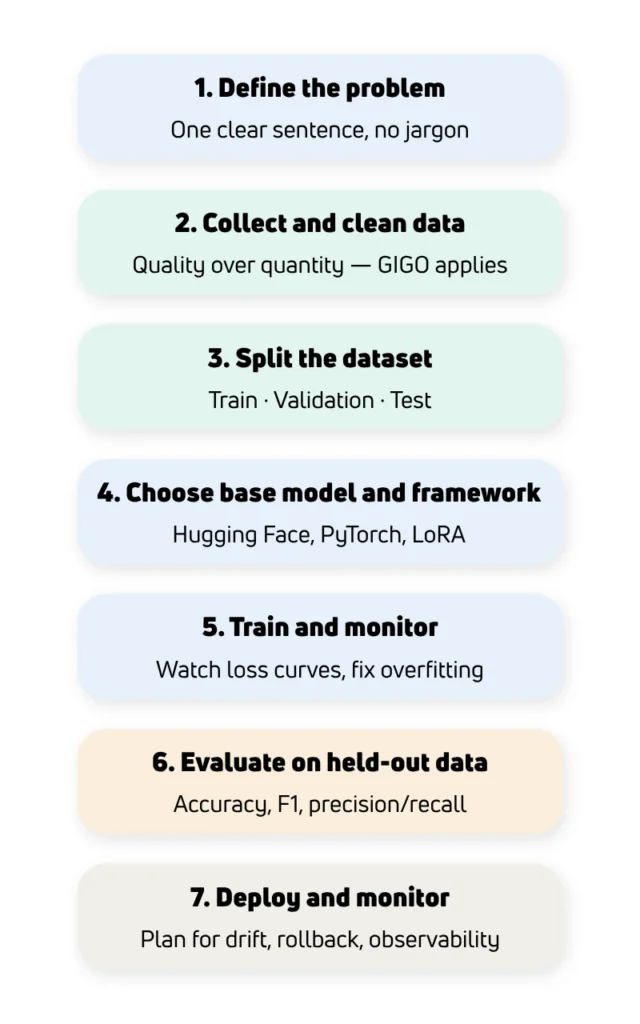
If fine-tuning is the right path for you, here is how the process works:
1. Define the problem clearly
If you cannot describe what you want the model to do in one sentence without jargon, you are not ready to train. Vague goals lead to wasted cycles and ballooning costs.
2. Collect and clean your data
Your model will be exactly as good as the data you give it, no better. “Garbage in, garbage out” is the most reliable rule in machine learning. Curate your dataset carefully, remove inconsistencies, and ensure it genuinely represents the task you are training for.
3. Split your data
Divide your dataset into three parts: training data (what the model learns from), validation data (used to monitor performance during training), and test data (held back to evaluate the final model).
4. Choose a base model and framework
For most use cases, start with an open-source foundation model from Hugging Face. Tools like Google AI Studio offer free fine-tuning for some models. Frameworks like PyTorch and TensorFlow handle the training mechanics.
5. Train and monitor
Run training and watch the loss curves. If the model performs well on training data but poorly on validation data, it is overfitting which means memorizing rather than learning. Adjust your dataset, model complexity, or regularization accordingly.
6. Evaluate on held-out data
Test on data the model has never seen. Metrics like accuracy, F1 score, and precision/recall give you a realistic picture of real-world performance.
7. Deploy and monitor in production
Most failed AI projects fail in deployment, not training. Plan for model drift, build monitoring into your pipeline, and have a rollback plan.
How to Train an AI Model Locally
If data privacy is a priority or you want full control without cloud costs, local training is possible, though it comes with hardware constraints.
Tools like Ollama, LM Studio, and Hugging Face Transformers make it straightforward to run and fine-tune models locally. For developers, fine-tuning a specialized Llama 3 or Mistral model on a local workstation is achievable with a modern GPU. Open-source fine-tuning techniques like LoRA are specifically designed to reduce memory requirements, making local training viable for smaller, task-specific models.
Local models that are small and specialized can also outperform large general models on narrow tasks like running over 1,000 times faster and at a fraction of the cost, precisely because they are focused on one problem.
How to Train a Generative AI Model
Training a generative AI model, one that produces text, code, or other content follows the same general process as above, but with specific considerations:
- Data format matters enormously. For text generation, your training data should be formatted as input-output pairs that demonstrate exactly the kind of output you want.
- Instruction tuning is a common technique: rather than training on raw text, you train on examples of instructions and desired responses, making the model more useful and controllable.
- Evaluation is harder. Unlike classification tasks, generative output does not always have a single right answer. Human evaluation and careful qualitative testing are essential.
From Trained Models to Autonomous AI Agents
Training a model gives you a powerful tool. But increasingly, teams are going a step further — wrapping trained models inside AI agents that can take actions, use external tools, and complete multi-step tasks autonomously.
If you are new to the concept of AI agents, how they work, how they differ from standard models, and what makes them useful, our guide What Are Agents in AI? covers the fundamentals clearly and is a natural next step after this article.
If you are ready to go beyond training and start building agents that can actually act on the world, retrieving information, making decisions, and completing complex workflows, our AI Agent Builder course is designed for exactly that. This technical certification covers agent architectures, reasoning frameworks, tool integration, and deployment patterns, giving you the skills to build autonomous agents that complete complex tasks with minimal human intervention.